TMS High Availability Architecture: The 48-Hour Failover Framework That Prevents Transportation Shutdowns

When Starbucks fell victim to the Blue Yonder ransomware attack in November 2024, baristas couldn't get paid and schedules turned to chaos. The coffee giant had to revert to manual calculations for employee pay. Meanwhile, Morrisons attributed slower Christmas sales to the disruption. These weren't small hiccups. When Procter & Gamble's Transportation Management System went down, they deployed a manual backup within 12 hours to avoid complete shutdown.
The numbers tell the real story. Unplanned downtime costs businesses $260,000 per hour on average, though for larger organizations, costs can escalate up to $1 million per hour when production lines are down. Your TMS isn't just software; it's the nervous system of your transportation operations. When it fails, everything stops.
When Single Points of Failure Become Supply Chain Disasters
The Blue Yonder attack in November 2024 affected major retailers including Starbucks, Sainsbury's, and Morrisons. Cybercriminals claimed to have stolen 680 GB of data from the company, including over 16,000 email lists and approximately 200,000 insurance documents. Other Blue Yonder customers include high-profile organizations like AB InBev, Asda, Bayer, Carlsberg, DHL, Marks & Spencer, Nestle, 3M, and Tesco.
Notice the pattern? One vendor failure rippled across dozens of major operations. John Donigian at Moody's explained: "When these systems go offline, essential workflows such as inventory management, demand forecasting, warehouse management and transportation planning are disrupted, bringing entire supply chains to a standstill".
Small deviations compound faster than most operations teams realize. A two-hour delay in carrier API responses cascades into missed cutoffs, which creates overnight shipping costs, which triggers expedite fees for downstream shipments. Supply chain disruptions cost large organizations an average of $182 million in lost revenue per company every year.
TMS High Availability Fundamentals: Beyond Basic Backup
Backup isn't high availability. Backup means you can restore yesterday's data after everything breaks. High availability means your operations never stop running, even when components fail.
The math matters. 99% uptime sounds good until you calculate 3.65 days of downtime per year. 99.9% still gives you 8.77 hours of annual outage time. For TMS operations handling thousands of shipments daily, you need 99.999% availability, which translates to just 5.26 minutes of downtime per year.
The TMS-Specific Availability Stack
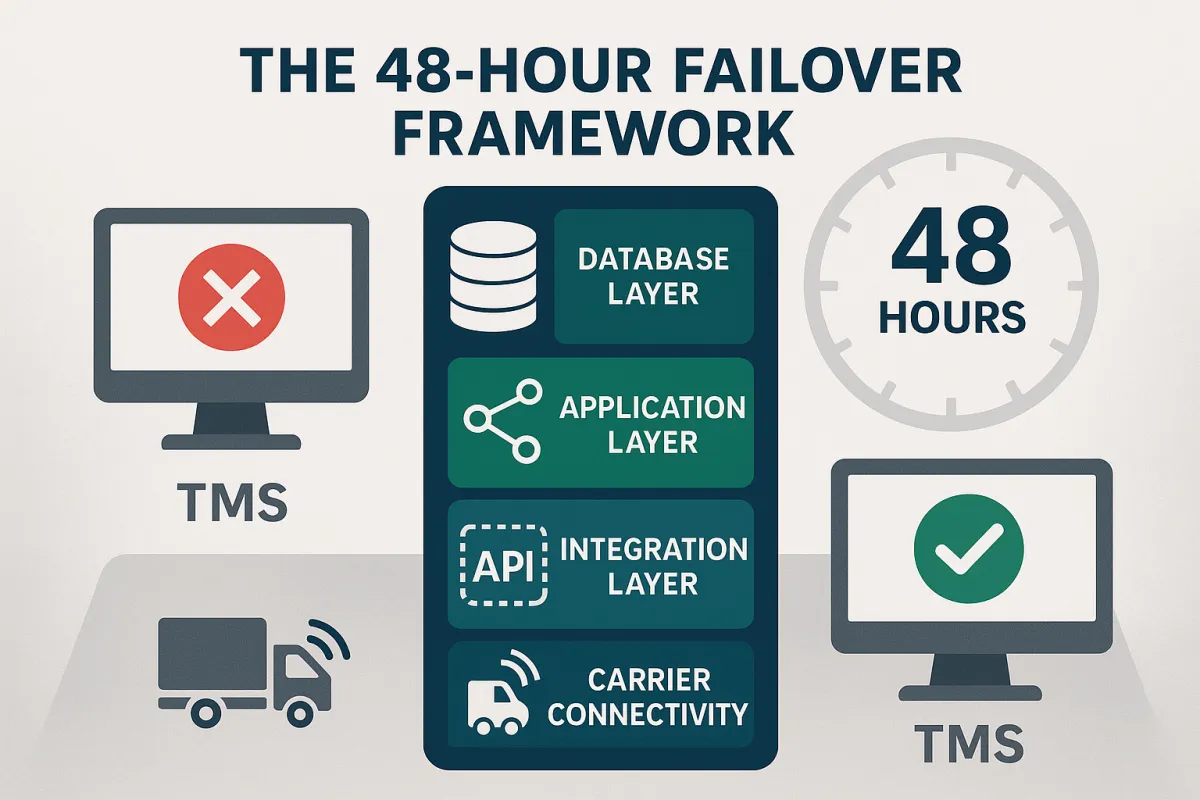
Your TMS high availability architecture needs redundancy at four critical layers:
Database Layer: Real-time replication of shipment data, carrier rates, and routing information between geographic locations. This isn't daily backups; it's continuous synchronization measured in milliseconds.
Application Layer: Active-passive or active-active clustering where multiple TMS instances run simultaneously. When the primary fails, traffic redirects instantly to secondary systems without user intervention.
Integration Layer: Multiple API endpoints for each carrier connection, webhook backup strategies for status updates, and EDI failover paths for legacy carrier systems.
Carrier Connectivity: Redundant network paths to carrier systems, backup authentication credentials, and alternative communication methods when primary channels fail.
Systems like Oracle TM, MercuryGate, SAP TM, and Cargoson handle these layers differently. Some excel at database replication but struggle with carrier integration failover. Others provide robust application clustering but limited geographic distribution options.
The 48-Hour Failover Framework: Step-by-Step Implementation
This framework assumes you have 48 hours to implement failover capabilities before your next maintenance window. It's designed for operations teams who need results, not theoretical architectures.
Hours 0-24: Pre-Planning and Assessment
Inventory Your Single Points of Failure: Document every system component that could bring down TMS operations. Include database servers, application servers, network connections, carrier API endpoints, and authentication systems.
Define Recovery Objectives: Set your Recovery Time Objective (RTO) - how quickly you need systems restored. For TMS operations, aim for 15 minutes maximum. Set your Recovery Point Objective (RPO) - how much data you can afford to lose. For shipment tracking, this should be zero.
Map Data Dependencies: Identify which data must replicate in real-time versus what can sync periodically. Shipment status updates need immediate replication. Historical reporting data can tolerate slight delays.
Hours 24-48: Active Configuration
Configure Database Replication: Set up synchronous replication for critical tables (shipments, carriers, rates) and asynchronous replication for less critical data (reports, analytics). Test failover scenarios to ensure data consistency.
Deploy Load Balancers: Install application load balancers that can detect TMS application failures and redirect traffic automatically. Configure health checks that test actual TMS functionality, not just server availability.
Establish Carrier Integration Redundancy: Configure backup API endpoints for each carrier. Set up webhook retry mechanisms and alternative notification paths. Test EDI connections through secondary communication channels.
Database Replication for Transportation Data
Shipment data changes constantly. A package moves from pickup to in-transit to delivered within hours. Your replication strategy must account for this velocity while maintaining data consistency across sites.
Implement synchronous replication for shipment status updates, carrier rates, and routing decisions. These require immediate consistency across all systems. Use asynchronous replication for historical data, analytics, and reporting tables where slight delays won't impact operations.
Monitor replication lag obsessively. A five-second delay in shipment status updates can cause duplicate notifications to customers or missed delivery exceptions.
Carrier Integration Redundancy
Carrier APIs fail more often than your TMS application. FedEx might have regional outages, UPS could experience authentication issues, or smaller carriers might have overnight maintenance windows they didn't announce.
Configure multiple API endpoints for each carrier when available. Most major carriers provide regional API access points. Store backup authentication credentials and test them regularly - credentials expire, and you'll discover this during an outage if you don't test proactively.
Set up webhook retry strategies. When carriers can't deliver status updates, your TMS should poll alternative endpoints or use EDI as a fallback communication method.
Geographic Redundancy for Multi-Site Operations
Single data centers fail. Regional outages happen. Natural disasters don't care about your uptime requirements. Geographic redundancy distributes your TMS infrastructure across multiple locations, protecting against regional failures.
Deploy primary and secondary data centers in different geographic regions, ideally separated by at least 100 miles to avoid common natural disasters or infrastructure failures. The secondary site shouldn't just be a backup; it should actively handle production traffic in an active-active configuration or be ready for immediate activation in active-passive setups.
Data synchronization between geographically dispersed centers requires careful planning. Network latency increases with distance, potentially affecting synchronous replication performance. Consider using asynchronous replication for non-critical data and synchronous replication only for essential transportation operations.
Test geographic failover regularly. Network partitions between sites can create split-brain scenarios where both locations think they're the primary system. Implement proper quorum mechanisms to prevent data inconsistencies during network failures.
Testing Your TMS Disaster Recovery (The 15-Minute Drill)
Monthly disaster recovery drills aren't suggestions; they're operational requirements. Research shows that 86% of ransomware victims are targeted either on holidays or weekends when IT departments are less than fully staffed. Your failover systems must work when you're not there to fix them.
The 15-minute drill tests whether your team can detect, acknowledge, and initiate failover procedures within a quarter-hour. This isn't about complete recovery; it's about rapid response when seconds matter.
Minute 1-5: Detection and Alerting - Your monitoring systems should detect failures and alert the right people immediately. Test whether alerts reach on-call staff, backup personnel, and management escalation paths.
Minute 6-10: Assessment and Decision - Teams must quickly assess the failure scope and decide whether to initiate failover procedures. Practice this decision-making process with different failure scenarios.
Minute 11-15: Failover Initiation - Begin executing failover procedures. Don't wait for complete recovery; test whether you can start the process quickly and correctly.
Common Failover Test Scenarios
Database Corruption Recovery: Simulate database failures and test whether your replication systems maintain data integrity during recovery. Include scenarios where both primary and secondary databases experience issues.
Carrier API Failure Simulation: Disable primary carrier connections and verify that backup endpoints activate automatically. Test whether shipment processing continues without interruption.
Network Partition Testing: Simulate network failures between data centers and test whether your systems handle split-brain scenarios correctly without creating data inconsistencies.
Different TMS platforms handle these scenarios differently. Blue Yonder's recent experience shows even major vendors can struggle with comprehensive recovery. E2open focuses heavily on cloud-based redundancy but may have limitations with on-premise integrations. Cargoson and similar cloud-native platforms often provide built-in failover capabilities but require testing with your specific carrier integrations.
Monitoring and Alerting: Early Warning Systems
Monitoring TMS high availability requires tracking metrics that predict failures before they happen. Traditional server monitoring catches problems after they've already impacted operations.
Database Performance Metrics: Monitor query response times, replication lag, and connection pool utilization. Set alerts when database queries take longer than normal baseline performance, indicating potential issues before complete failures.
Carrier Integration Health: Track API response times, authentication failures, and webhook delivery success rates for each carrier. Establish baseline performance and alert when metrics deviate significantly.
Application Response Monitoring: Measure TMS transaction completion rates, user session timeouts, and page load times. These metrics often indicate underlying issues before system failures occur.
Configure escalation procedures that automatically promote alerts when initial responders don't acknowledge issues within defined timeframes. Include backup contacts and management escalation paths.
Document incident response procedures that non-technical staff can execute. When your primary IT team is unavailable, operations managers should be able to initiate basic failover procedures using documented runbooks.
The 90-Day High Availability Rollout Plan
Implementing TMS high availability without disrupting current operations requires a phased approach. This 90-day plan minimizes risk while building robust failover capabilities.
Days 1-30: Planning and Infrastructure Setup - Complete the 48-hour failover framework implementation. Deploy secondary systems and configure basic replication. Test connectivity between primary and secondary sites without activating failover procedures.
Days 31-60: Integration and Testing - Configure carrier integration redundancy and begin limited testing with non-critical shipments. Train operations staff on new monitoring dashboards and alert procedures. Document all failover processes and create emergency runbooks.
Days 61-90: Full Deployment and Optimization - Activate all high availability features and conduct comprehensive disaster recovery drills. Monitor performance metrics and optimize configurations based on actual operational patterns. Plan for ongoing maintenance and regular testing schedules.
Throughout the rollout, maintain detailed logs of all changes and test results. When problems occur (and they will), you'll need this documentation to identify root causes and improve your architecture.
Your TMS high availability architecture isn't a one-time project; it's an ongoing operational requirement. Regular testing, monitoring optimization, and procedure updates ensure your transportation operations remain resilient against the next inevitable system failure or cyberattack.
The cost of downtime continues rising, but the tools and techniques for preventing it have never been more accessible. Start with the 48-hour framework, implement the monitoring essentials, and build from there. Your next system failure will test whether you prepared correctly.